We find learning gaps and help your teen close them.
Kairo is an AI tutor that finds where your teen is stuck. It gives one hint at a time, has your teen explain why, and plans when to start and when to study.
Rather talk it through? Book a 15-minute walkthrough.
For teens: see how Kairo works for you →
Kairo works the way a great tutor does.
A great tutor lets your teen try, sees when they're stuck and gives just enough help. Kairo does that for every teen.
- Try first.
- Get a hint.
- Explain why.
Kairo: Here's your problem: Let p(x) = x³ + 2x − 4. What is the remainder when p(x) is divided by (x − 1)? Give it a try and tell me how you get your answer.
Teen: I think it's 13
Kairo: 13 isn't the remainder. Walk me through how you got it, and tell me what value of x you plugged in, if you plugged one in. Which value of x makes x − 1 equal zero?
Teen: can I get a hint?
Kairo: Here's a smaller step. The remainder theorem links dividing by (x − a) to plugging a single number into p. In this problem the divisor is (x − 1). What number does that tell you to plug into p(x), and what do you get when you do?
Teen: my answer is -1
Kairo: Yes, −1 is right. Why does that method give the remainder?
Teen: If you divide p(x) by (x - a) you get (x - a) times a quotient, plus the remainder. When x = a, the (x - a) part is 0, so only the remainder is left. So p(a) is the remainder.
Kairo: Yes. You wrote the division as (x − a) times a quotient plus the remainder, then noticed that x = a zeroes out the quotient term. That leaves p(a) as the remainder, which gives p(1) = 1 + 2 − 4 = −1 here. Want the next problem?
Find the gaps, close them, then plan for success.

Find the gaps.
Kairo notices where your teen gets stuck. Your dashboard shows what they've learned and where they need help.
Two-step equationsLearned

Close them.
Kairo gives one small hint at a time, and your teen does the work. When they get it right, they explain why in their own words.

Plan for success.
Add a test or a project. Kairo plans the day to start and the days to study, with a practice set before each test. A calendar link puts it all on your family calendar.
As your teen learns their schoolwork, they also learn how and when to use AI. See the AI skills →
Peace of mind, built in.
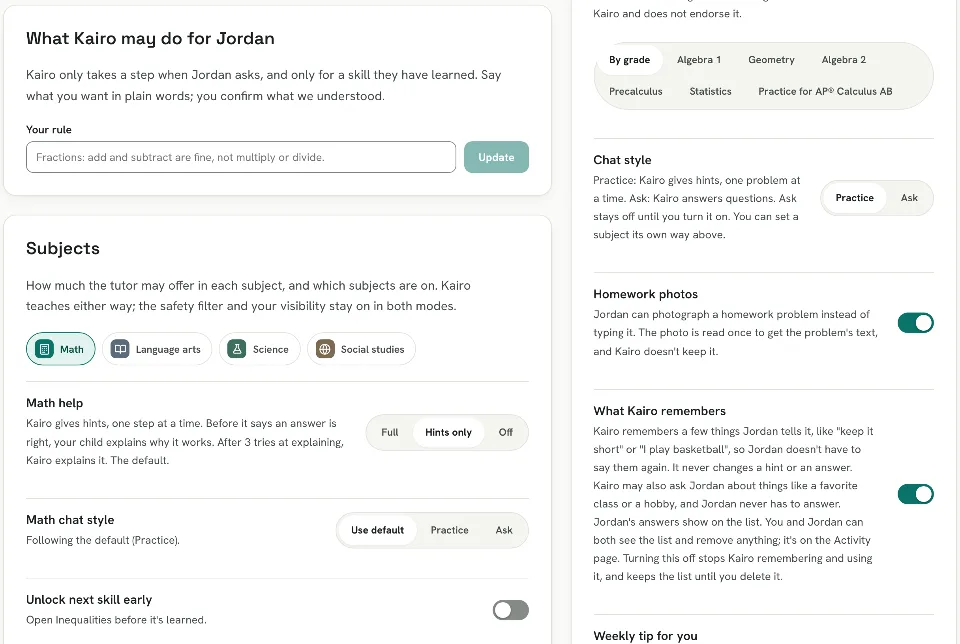 Open Controls in the demo →
- Kairo starts with hints only. Your teen does their own homework.
- Once your teen proves a skill, they can ask Kairo to do that step on practice problems, not homework. For a new account it stays off until you say yes, once per subject. You can lock any skill.
- Ask is a chat for school questions in any subject. It is off until you turn it on.
- You set healthy AI screen time: minutes a day, the hours Kairo is on, and a weekend pause.
- Have a tutor? Kairo is there every night in between. Your dashboard shows what to work on next time.
- A co-parent can have their own sign-in. Can both parents use Kairo? →
- Every Sunday, an email sums up the week. See a sample →
We prepare teens for a world that keeps changing.
They learn the work first, then learn to use AI well.
One price per child. No hidden fees.
Free for 7 days, then $25 a month per child.
Each child gets:
- Hints on homework in every subject
- Practice that finds gaps in math, English, science and social studies
- A study plan before every test
- A Sunday email on what they learned
We ask for a card at sign-up and email you before the free week ends. Cancel any time from your dashboard.
Have a code? Add it when you start your plan.
Rather talk it through? Book a 15-minute walkthrough.